JavaScript | Смена иконки в input
Тема закрыта by
 Копирайтер [!]
Салам. Короче проблема. Не могу понять, как сделать так, чтобы менялась иконка внутри поля инпут в зависимости от введенного в нем текста. На примере, в первое поле внесена ссылка с соц.сети твиттер - подтянута иконка твиттер. Во втором поле внесена ссылка инстаграм - нужно, чтобы подтягивалась иконка инстагарм. Дальше по другим сетям с такими же полями input.
Сам код вот (тапками не бросать):
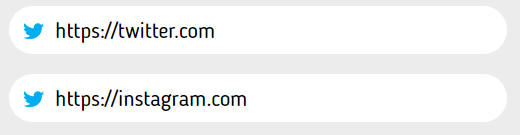

Сам код вот (тапками не бросать):
.icon {
      position: absolute;
      border: none;
      margin: 25px 25px 25px 15px;
    }
    .icon:before {
      content: url(../img/icon/twitter1.png);
      width: 100%;
    }

<form>
    <a class="submit icon"></a><input class="user-link" type="text" placeholder="https://">
    <a class="submit icon"></a><input class="user-link" type="text" placeholder="https://">
</form>
Пробовал отлавливать введённый текст. От него уже менять сам класс. Внутри класса использовать иконки.
Но увы, что то не выходит. Нужна помощь
Но увы, что то не выходит. Нужна помощь
Возможно, посредством JS?
Обратись к Rewerk, он в этом деле профи.

 Пупсь Сайбот
Обратись к Rewerk, он в этом деле профи.
Пупсь Сайбот (04.11.2021 в 13:02)
Возможно, посредством JS?
Обратись к Rewerk, он в этом деле профи.
Ну так тема в каком разделе? Конечно жабой.
Возможно, посредством JS?
Обратись к Rewerk, он в этом деле профи.
popka_slonika, может быть подойдет что-то вроде этого, конечно лучше ссылки проверять через startsWith (или в indexOf ставить === 0), но для этого надо знать точный пример ссылки (прим. https://twitter.com)
так же обернул

 steel97
так же обернул
<html>
<head>
<style>
	    .icon {
	      position: absolute;
	      border: none;
	      margin: 25px 25px 25px 15px;
	    }

	    .twitter:before {
	      content: url(twitter.png);
	      width: 100%;
	    }

            .instagram:before {
	      content: url(instagram.png);
	      width: 100%;
	    }
</style>
<script>
function refreshIcon(target) {
	let iconClass = "twitter"
	if (target.value.indexOf("instagram") > -1) {
		iconClass = "instagram";
	}

	target.previousSibling.classList = `submit icon ${iconClass}`;
}
</script>
</head>
<body>

	<form>
	    <a class="submit icon"></a><input class="user-link" type="text" placeholder="https://" oninput="refreshIcon(this)">
	    <a class="submit icon"></a><input class="user-link" type="text" placeholder="https://" oninput="refreshIcon(this)">
	</form>

</body>
</html>
или даже так лучше будет
<html>
<head>
<style>
		.icon {
	      position: absolute;
	      border: none;
	      margin: 25px 25px 25px 15px;
	    }

	    .icon:before {
	      content: var(--icon);
	      width: 100%;
	    }
</style>
<script>
function refreshIcon(target) {
	let iconLink = "twitter.png"
	if (target.value.indexOf("instagram") > -1) {
		iconLink = "instagram.png";
	}

	target.previousSibling.style = `--icon: url(${iconLink})`;
}
</script>
</head>
<body>

	<form>
	    <a class="submit icon"></a><input class="user-link" type="text" placeholder="https://" oninput="refreshIcon(this)">
	    <a class="submit icon"></a><input class="user-link" type="text" placeholder="https://" oninput="refreshIcon(this)">
	</form>

</body>
</html>